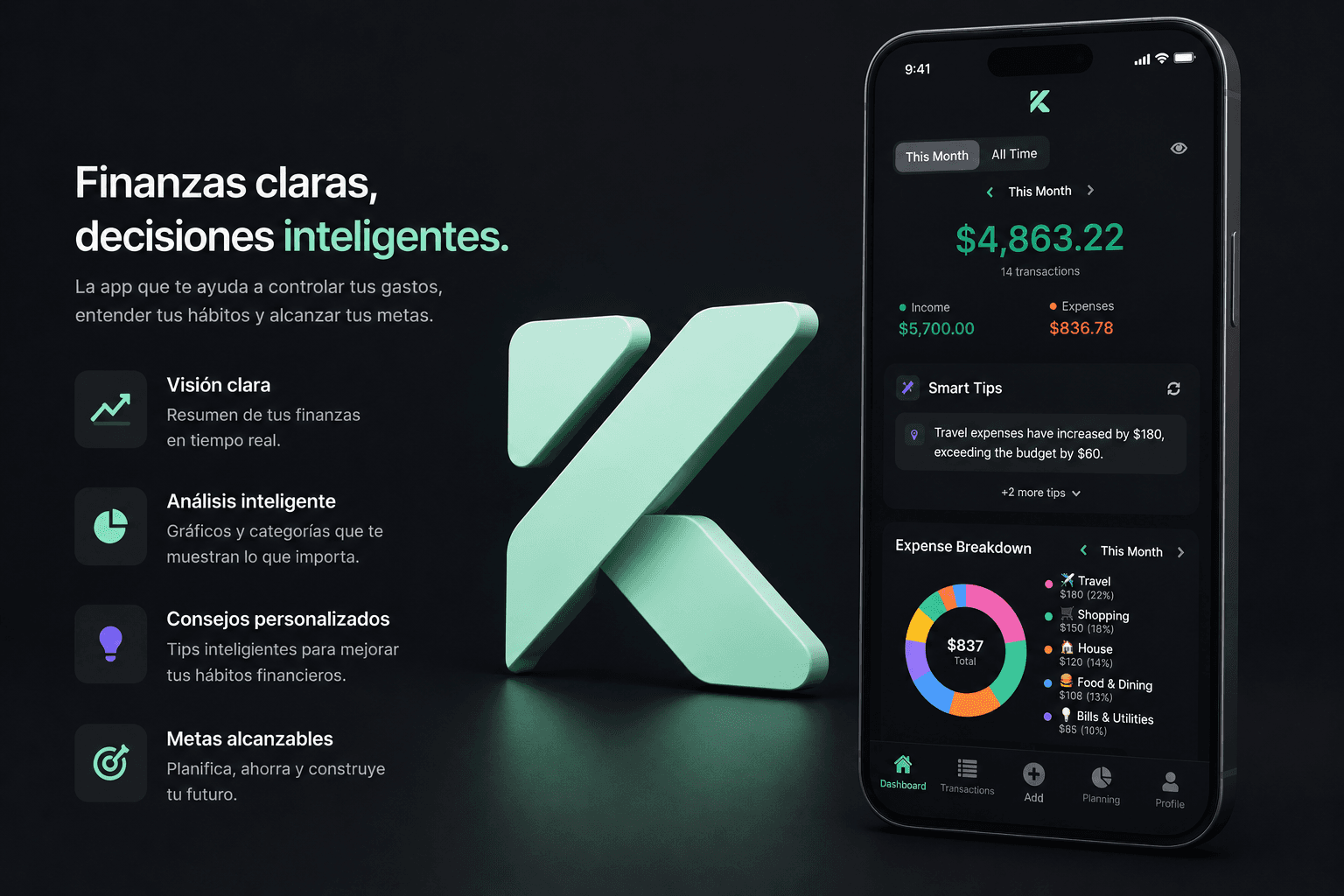
Kash - Personal Finance App
Kash is a full-featured personal finance application that I developed independently in my free time. The app helps users track expenses, manage budgets, set savings goals, and gain insights into their spending habits. Built with modern React Native architecture, it features a clean UI with dark mode support, bilingual interface (English/Spanish), and AI-powered financial insights using Groq's API. The app is production-ready and prepared for App Store submission.
Key Features
Transaction tracking with income/expense categorization
Budget management with alerts and rollover options
Savings goals with progress tracking and milestones
AI-powered financial insights using Groq API
Recurring transactions with push notifications
Multi-currency support (USD/ARS with Blue Dollar rates)
Beautiful charts and visualizations (category breakdowns, spending trends)
Data export to CSV with date range filtering
Dark mode and light mode with system-based auto-switching
Bilingual interface (English/Spanish) with i18n support
Apple Sign-In and Google Sign-In authentication
Secure authentication with Supabase Auth and Row Level Security
Real-time exchange rate tracking
Search and filter transactions
Monthly spending summaries and comparisons
Challenges & Solutions
State Management at Scale
Managing complex state across multiple features (transactions, budgets, goals, recurring items) while maintaining performance and data consistency.
Solution:
Implemented Zustand stores with persistence middleware for efficient state management, using AsyncStorage for local caching and 5-minute cache durations to balance freshness and performance
Real-time Data Synchronization
Implementing efficient caching strategies and real-time updates with Supabase while ensuring optimal user experience and minimal API calls.
Solution:
Created a centralized store architecture with separate stores for transactions, budgets, goals, and recurring items, each with optimized fetch methods and cache invalidation
AI Integration and Cost Optimization
Integrating AI insights using Groq API while implementing smart caching to minimize API calls and costs, ensuring insights remain relevant and actionable.
Solution:
Built AI insights caching system with 24-hour cache duration and transaction count validation to prevent unnecessary API calls while keeping insights fresh
Multi-currency and Exchange Rate Handling
Implementing accurate currency conversion with real-time exchange rates, including special handling for Blue Dollar rates in Argentina.
Solution:
Implemented Row Level Security (RLS) policies in Supabase to ensure users only access their own data, with proper indexing for query performance
Code Examples
Zustand Store with Persistence
State management using Zustand with AsyncStorage persistence and smart caching
import { create } from 'zustand';
import { persist, createJSONStorage } from 'zustand/middleware';
import AsyncStorage from '@react-native-async-storage/async-storage';
import { supabase } from '@/lib/supabase';
const CACHE_DURATION = 5 * 60 * 1000; // 5 minutes
interface TransactionsState {
transactions: TransactionWithCategory[];
loading: boolean;
lastFetched: number | null;
}
interface TransactionsActions {
fetchTransactions: (userId: string, forceRefresh?: boolean) => Promise<void>;
addTransaction: (userId: string, transaction: Transaction) => Promise<{ error: Error | null }>;
}
export const useTransactionsStore = create<TransactionsState & TransactionsActions>()(
persist(
(set, get) => ({
transactions: [],
loading: false,
lastFetched: null,
fetchTransactions: async (userId: string, forceRefresh = false) => {
const { lastFetched, transactions } = get();
const now = Date.now();
// Use cache if valid and not forcing refresh
if (!forceRefresh && lastFetched && now - lastFetched < CACHE_DURATION && transactions.length > 0) {
return;
}
set({ loading: true });
const { data, error } = await supabase
.from('transactions')
.select('*, category:categories(*)')
.eq('user_id', userId)
.order('transaction_date', { ascending: false });
if (!error) {
set({ transactions: data || [], loading: false, lastFetched: Date.now() });
}
},
addTransaction: async (userId, transaction) => {
const { error } = await supabase.from('transactions').insert({
...transaction,
user_id: userId,
});
if (!error) {
await get().fetchTransactions(userId, true);
}
return { error };
},
}),
{
name: 'kash-transactions',
storage: createJSONStorage(() => AsyncStorage),
}
)
);Theme Hook with User Preferences
Custom hook for theme management that respects system settings and user preferences
import { useColorScheme as useDeviceColorScheme } from 'react-native';
import { useSettingsStore } from '@/stores';
import Colors from '@/constants/Colors';
export function useTheme() {
const deviceColorScheme = useDeviceColorScheme();
const { theme } = useSettingsStore();
const colorScheme = theme === 'system' ? (deviceColorScheme ?? 'light') : theme;
return {
colorScheme,
colors: Colors[colorScheme],
isDark: colorScheme === 'dark',
};
}
// Usage in components:
function MyComponent() {
const { colors, isDark } = useTheme();
return (
<View style={{ backgroundColor: colors.background }}>
<Text style={{ color: colors.text }}>Hello</Text>
</View>
);
}AI Insights Generation with Caching
AI-powered financial insights using Groq API with smart caching to minimize API calls
import { generateInsights } from '@/lib/ai';
import AsyncStorage from '@react-native-async-storage/async-storage';
const CACHE_KEY = 'kash-ai-insights';
const CACHE_DURATION = 24 * 60 * 60 * 1000; // 24 hours
interface CachedInsights {
insights: string[];
timestamp: number;
transactionCount: number;
}
export function AIInsightsCard() {
const { transactions } = useTransactionsStore();
const { budgets } = useBudgetsStore();
const { language } = useSettingsStore();
const [insights, setInsights] = useState<string[]>([]);
// Load cached insights
useEffect(() => {
loadCachedInsights();
}, []);
const loadCachedInsights = async () => {
const cached = await AsyncStorage.getItem(CACHE_KEY);
if (cached) {
const data: CachedInsights = JSON.parse(cached);
const now = Date.now();
if (now - data.timestamp < CACHE_DURATION &&
Math.abs(data.transactionCount - transactions.length) < 5) {
setInsights(data.insights);
}
}
};
const handleGenerateInsights = async () => {
const result = await generateInsights(transactions, budgets, language);
if (result.insights.length > 0) {
setInsights(result.insights);
await AsyncStorage.setItem(CACHE_KEY, JSON.stringify({
insights: result.insights,
timestamp: Date.now(),
transactionCount: transactions.length,
}));
}
};
return (
<View>
{insights.map((insight, i) => (
<Text key={i}>{insight}</Text>
))}
<Button onPress={handleGenerateInsights} title="Get Insights" />
</View>
);
}CSV Export with Date Range Filtering
Export transactions to CSV with flexible date range options
import { documentDirectory, writeAsStringAsync, EncodingType } from 'expo-file-system/legacy';
import { shareAsync } from 'expo-sharing';
export async function exportTransactionsToCSV(
transactions: TransactionWithCategory[],
filename?: string
): Promise<{ success: boolean; error?: string }> {
try {
// Create CSV content
const headers = ['Date', 'Type', 'Category', 'Amount', 'Description'];
const rows = transactions.map((t) => [
t.transaction_date,
t.type,
t.category?.name || '',
t.amount.toFixed(2),
`"${(t.description || '').replace(/"/g, '""')}"`,
]);
const csvContent = [headers.join(','), ...rows.map((row) => row.join(','))].join('\n');
// Write file
const date = new Date().toISOString().split('T')[0];
const finalFilename = filename || `kash-transactions-${date}.csv`;
const filePath = `${documentDirectory}${finalFilename}`;
await writeAsStringAsync(filePath, csvContent, { encoding: EncodingType.UTF8 });
// Share file
await shareAsync(filePath, {
mimeType: 'text/csv',
dialogTitle: 'Export Transactions',
});
return { success: true };
} catch (error) {
return {
success: false,
error: error instanceof Error ? error.message : 'Failed to export',
};
}
}What I Learned
Deepened understanding of React Native and Expo ecosystem, including file-based routing with Expo Router
Learned to implement efficient state management patterns with Zustand, including persistence and cache strategies
Gained experience with Supabase backend integration, including authentication, database design, and RLS policies
Improved skills in TypeScript for type-safe mobile development with proper type definitions for database schemas
Learned to integrate AI APIs (Groq) into mobile apps with proper error handling and caching strategies
Gained experience with internationalization (i18n) implementation for bilingual apps
Improved understanding of mobile UX patterns, including dark mode implementation and responsive design
Learned to optimize app performance with caching, lazy loading, and efficient data fetching strategies
Interested in This Project?
Let's discuss how I built this and how I can help you with similar projects.
Get in Touch